Submit your paper to EPS at SpringerOpen
EPS welcomes you to submit your papers through SpringerOpen.
EPS Journal accepts scientific articles in earth and planetary sciences, particularly geomagnetism, aeronomy, space science, seismology, volcanology, geodesy, and planetary science.
Please read the instruction in this page as well as in the submission guideline carefully before you submit the paper to EPS.
Types of Articles and The Guidelines
EPS accepts the following articles. Please click the respective types of articles to see the detailed submission guidelines.
- Full Paper : An original full-length manuscript
- Express Letter : A brief report of research findings for rapid publication
- Frontier Letter : An invited letter on frontier research
- Technical Report : A report on a software tool; an experimental or computational method, test, or procedure; or a hardware design
- Comment
Templates and formats
Please download and use the following templates to make the publication process easier.
Since 2024/06, templates were modified to have a section number.
Word limit for Express letter
An Express Letter is a brief report of research findings adequate for the journal’s scope and of particular interest to the community.
The maximum length of the main text, figure and table legends of an Express Letters is 5000 words. The sum of the number of figures and tables should be less than or equal to 5.
Option of In Review during the submission 
In Review option has been available during the submission to EPS.
In Review on the Research Square platform is a free service for authors submitting to Springer Nature journals to provide a preprint with a DOI and to track the status of your manuscript.
The authors can select area of studies (e.g., Geophysics, Planetary Science, Seismology, Volcanology, and Space Exploration), and multiple choices are available.
Article Processing Charge (APC)
The publication fee for 2026 is £1,050 / $1,690 / €1,370.
No taxes are included in this charge, and the base currency is the euro (€).
Please check here about taxes.
The APC for society members is applicable when a corresponding author belongs to any of the five societies that co-publish EPS.
(Note 1) For members of the five societies, an approximately 20% discount is available. For a Full paper/Technical report (€1,370), the fee after applying the five-society member discount is €1,106.27.
(Note 2) Currently, an approximately 30% APC discount is available for Express Letters for both members of the five societies and non-members. This discount applies to Express Letters submitted on or after March 1, 2025, and accepted by July 31, 2028. The discounted fee is €989.82.
(Note 3) Value-added tax (VAT) applicable to the country of residence will be added to the APC.
(Note 4) For Japanese researchers, the amount charged will be converted from euros (€) to U.S. dollars ($), and then to Japanese yen, based on the exchange rate at the time.
(Note 5) The amount charged will be converted from euros (€) to U.S. dollars ($), and then to Japanese yen, based on the exchange rate at the time.
Important Notes for Payment Options
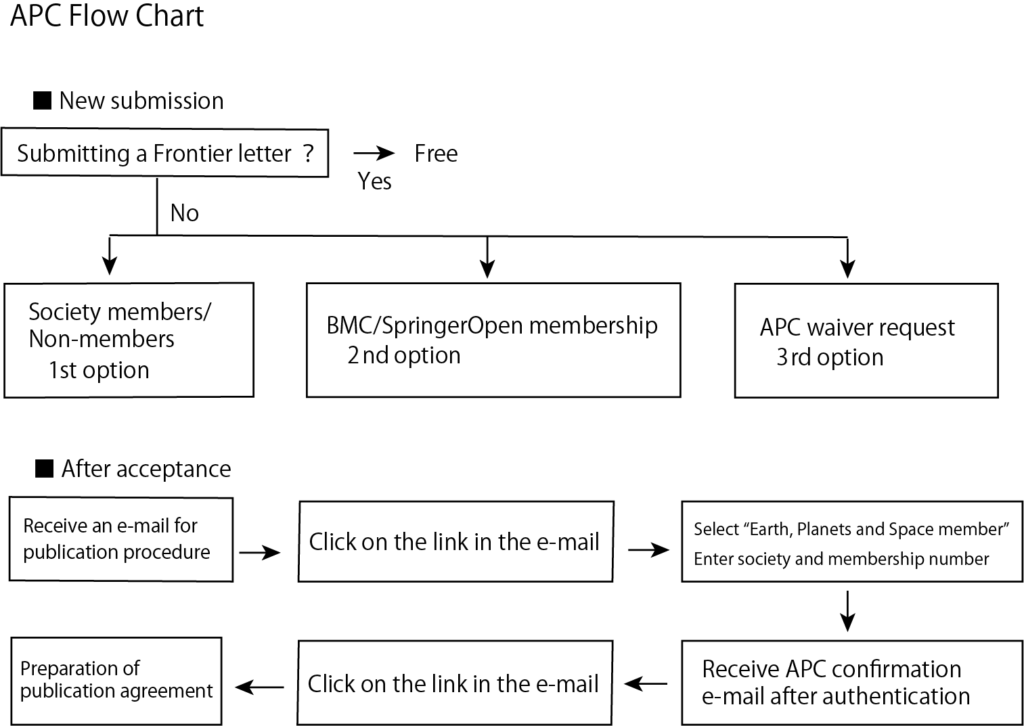
■ New submission
・Publication Charges page → Click on「View Publication Charges」
・APC Agreement page → Select the first option and click on「Confirm」
※ The code input previously required for submission is no longer necessary
If your institution has a membership account with BMC or SpringerOpen, please select the second option. If you wish to request a waiver or reduction of the publication fee, please select the third option and enter the reason.
■ After acceptance
An e-mail is sent to the Corresponding Author to proceed the publication (this is not an Acceptance Letter). Click on the “link” in the e-mail.
・Select country page → Select your country of residence
・Open access information page → If you have an APC Token, enter it and click “Apply” to get the price after applying the Token. Click “Next”.
・Institution or University page → Select the name of your institution. If your institution’s name is not listed, please enter it manually. Click “Next”.
・Confirm your eligibility status page → The APC information based on the institution is displayed. For institutions without an arrangement, the APC will not change. Click “Next”.
・Journal partners page → If you wish to request an APC waiver or reduction by the organization, click the name of the organization displayed and enter your membership number in the entry field. Click “Next”.
・Check your answers page → After confirming the information, click “Next” and press the Submit for Approval button.
■ Procedure for publication
Based on the information entered above, an APC confirmation e-mail is sent to you once the membership verification is completed. Click on the “link” in the e-mail.
・Agree to publish page → In order to create a publishing agreement (License to Publish), please select the appropriate organization for the Corresponding Author. Authors affiliated with institutions in Japan should select “Neither of the above”. Then click “Generate publishing agreement”. A publishing agreement (License to Publish) will be created and displayed. Scroll down the screen and check the contents. If you are satisfied with the contents, click the checkbox and “I agree and submit” button.
・Permission to publish complete page → Please click on “Download agreed publishing agreement” to download the agreement as a copy for the author.
- Frontier Letters
- If you are submitting a frontier letter invited by the editor-in-chief of the journal and have chosen “frontier letter” as the article type, you will see the message “No payment is required as this article is a frontier letter“. In the cover letter, you also need to clarify that you are an invited author and the APC is free.